Showing posts with label holiday cards. Show all posts

Wednesday, November 21, 2018

Holidays with Mixbook

Ahhh it's the most wonderful time of the year, am I right??! We have so many fun festivities coming up and to kick off the month of December, I like to be right on top of sending out my holiday cards - sending them out on December 1st to be exact.

Now don't think I always have my stuff together, there were plenty of years it was well within the month they were sent out, but the past few years, I've been able to stay on top of it, which I enjoy much better.

I love sending and receiving holiday cards, literally when I see them in the mail I get instantly happy. My kids love seeing them displayed throughout our house too - I really hope sending out cards never goes away!

There are so many places to order  your Christmas cards from, but this year I went with Mixbook - I have used Mixbook several times in the past and I know their quality is top notch. They are always running awesome promos too!!

The collection of holiday cards they have to choose from is plentiful!! There is no way you won't find something you love.


I love that they offer the real gold foil option too - it just adds that extra sparkle to your cards!


I also really appreciate all the different filter options. I always know how many pictures I want to use, so choosing that helps eliminate all cards that wouldn't work, which in turn saves me time!


If you  haven't ordered your cards yet, check out Mixbook and their current promo and you will save TONS of money, and have high quality, gorgeous cards this year!


And for fun, here's a little sneak of our card this year!


Just love those 3!!


So, have you ordered from Mixbook before? Where do you get your holiday cards from?


Wednesday, November 29, 2017

Holiday Cards with Shutterfly

I don't know about you, but I love sending out Christmas cards! We didn't start doing this until we had kids and it's something I look forward to every year!

Usually when I am thinking of holiday cards, my brain goes to Shutterfly because I know they are great quality, have lots of designs and always have promos going on.

Just look at these!

via

via

I LOVED how colorful this one was!

via


Before you even start browsing though, Shutterfly makes it SUPER easy to see just how your card would look - they have the feature to upload your photo and it will place it in every card!! How awesome!?!


Usually I choose a card with just 1 photo of us, but this year I tried it out using multiple too..


And I loved that look!! After browsing and browsing I went with traditional colors and I am so happy with it!! 


Another thing I took advantage of was adding pictures on the back. This is such a fun touch and a way to show more about your year.  Since this year we went to Disney and that was our big vacation, it only seemed fitting to add lots of pictures of that!


If you are looking for holiday cards or even unique holiday gifts, Shutterfly is a great place to go! To see all their personalized gifts, go here

I absolutely love these latte mugs! You can add any pictures and pick from quite a few sayings - these would make awesome parent/Grandparent gifts!!

Rustic Birch Latte Mug
via


Thank you Shutterfly for helping create our beautiful Christmas cards!!


Do you send out holiday cards? Have you gotten started yet?


Linking up with Jenn for WHW  

this post was sponsored by Shutterfly, all opinions are my own

Wednesday, October 19, 2016

Design Your Own Holiday Card {tutorial}

I've seen so many bloggers talking about holiday cards lately and it put me in the mood to start on ours! While I wish I could say this would be a sponsor post with Minted or Shutterfly, it is not (but seriously, how can I make that happen because I'm super jealous of all of you)

Anyway, last year I designed our card (for free) myself using PicMonkey and didn't document the process, so I thought I would this year. PicMonkey has tons of options to choose from for free, and they have even cooler stuff if you become a Royale member, but this Mama is all about free, so that's the route I take when I use their site.

Here is last years card (I loved how it turned out!)


Ok, so first thing I do when I'm getting ready to make our card is browse other websites to get ideas. Once I see something I like and that can be closely replicated, I then go to PicMonkey and get started.


Here is the picture I chose for this years Christmas card


Step 1. Once you log onto to PicMonkey, hover your curser over the top of the page and options will drop down.  Click on Design.


Step 2. Click Open and chose your image you are going to design


Step 3. Your image will now be to the right and you need to choose the Tt on the left hand side to get to the text options.


Step 4.  Start messing around with different fonts and choose what you like best. You can customize the color and size as well. Just click add text and a box will appear on your image. You can drag it anywhere on the design.


Step 5.  Click on the butterfly logo to the left - that is where you find the overlays, aka the objects you can use to enhance your design. Choose whatever one works for you!


As you can see, I clicked on one of the stars and just added a bunch to my design.


My idea was to make them look like snowflakes so I changed them to white and made them smaller.


I chose to scatter the snowflakes on each side of my card to look like falling snow


Step 6. Once you are done adding overlays to your design, it is time to go back to the text (Tt) and choose your font for your signature. You can do this at the same time as you are writing your holiday message, but I like to do it at the end.


And that's it, you are done.  I chose to go a more simple route this year and love it!
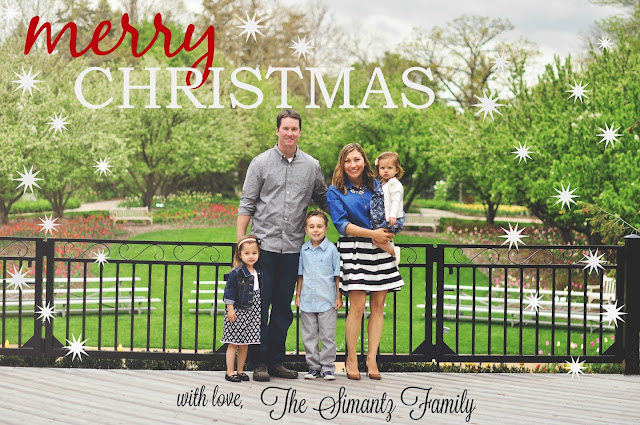


Now you can upload to anywhere and have them printed.  I usually choose Costco or Vistaprint because they are the most inexpensive for good quality. I also always choose just to buy the cards, not the envelopes because I can go to Michaels and get 50 for a good price while using a coupon of course!

Here's a tip if you do use Vistaprint - upload your image and have it printed on a postcard in your choice of size, it is a fraction of the cost vs. using an invitiation or holiday card template.

I would love to know if anyone uses this method to create their holiday cards!


Oh and if you like this post, you can hover over the below image and pin it directly to Pinterest to save for when you need it! (and it would be much appreciated!)


*linking up with Jessi's Deisgn for What's Hap-Pinning

 
BLOG TEMPLATE BY DESIGNER BLOGS
